Ideas with somewhere to go
Move Adventure Seeds into Story Boards and the Action Plan, keeping preparation inside the right adventure.
Prepare
Turn ideas into a workable plan for the next game.
GM Mentor helps you work through a campaign one night at a time. Gather ideas in Story Forge, arrange them into a Story Arc, and keep the action plan close when you run the game. Start with the Demo Game if you would like an example to work from.
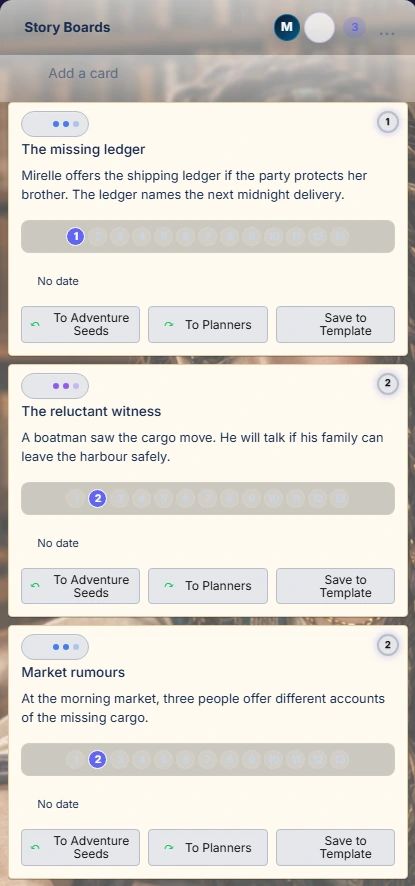
Move Adventure Seeds into Story Boards and the Action Plan, keeping preparation inside the right adventure.
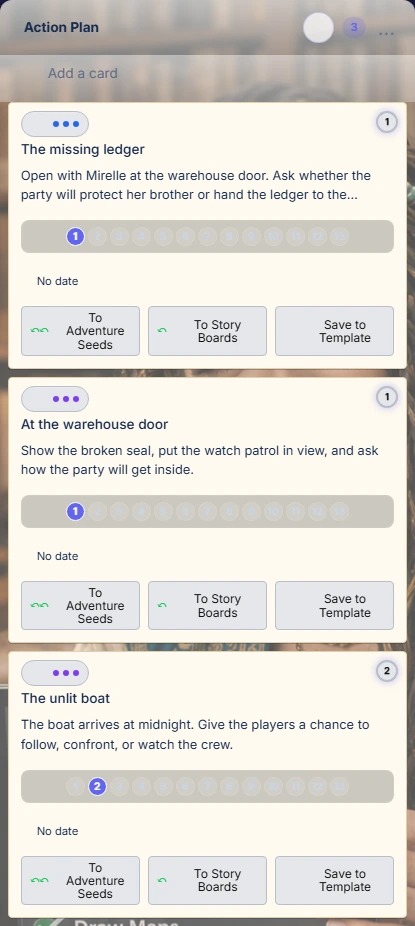
Organise nights of play with an opening image, first prompt, important events, and fallback notes.
Use Talk with Alaric to discuss the current game. Review proposed cards before adding them to your plan.
Keep the roster and current night connected to the campaign, with calendar and invitation tools where configured.
Compare the plan with reviewed Scribe evidence in Night Review, then decide which suggestions belong in the next night.
Begin with the Demo Game to see a prepared campaign, or select your own adventure. Check the adventure name, current night, party roster, and save state before editing. Those choices determine which campaign receives the cards, advice, and later review.
Use Story Forge for developing material, Story Arc for arranging nights of play, and Talk for a focused conversation with Alaric. Adventure Seeds are shared raw ideas across games; Story Boards and the Action Plan belong to the selected adventure. An interesting seed can wait until you decide where it belongs.
Add an idea manually, bring in source material, or develop one with Alaric. Decide whether it offers information, an NPC relationship, exploration, combat, atmosphere, or a choice with consequences. Promote a selected seed to a Story Board when you can explain what it contributes to this adventure.
Open a card to work on its premise, purpose, dependencies, and payoff. In Smart Card Builder, add your notes, choose Shape these notes, and read or edit the proposals before applying the ones you accept. Use Cast, Maps, and Documents to prepare its supporting material. Check Card Readiness and Check Adventure Fit help you review it with Alaric. Save the changes and bring the card into the Action Plan when its prompt and likely consequences are useful at the game.
“The missing ledger” appears below as a rough idea, a developing scene, and a prepared game prompt. Click its highlighted card to look inside and follow how you add and review information.
Example cards from the fictional Lantern Harbour adventure.
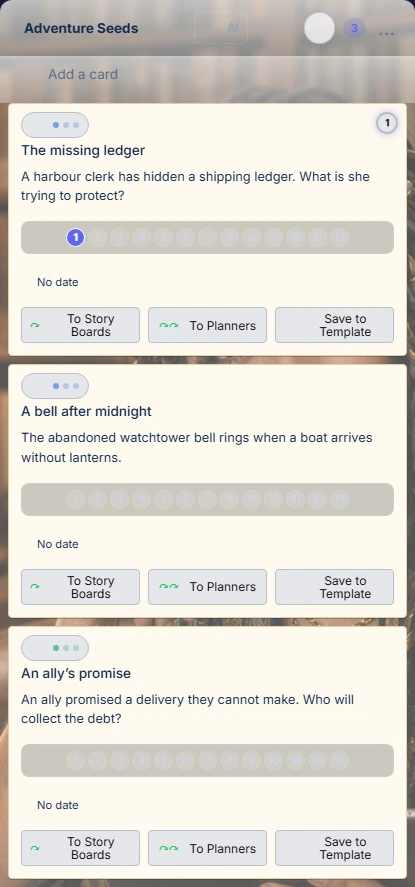
Keep a rough idea here while you decide whether it belongs in your adventure.
Enlarge boardUse Generate Nights to organise Action Plan material into the adventure’s night board, then inspect the assignments. The ordinary board uses thirteen nights. Look for clues that must precede a payoff, unresolved obligations, and nights that are too thin or crowded. Move material when the party’s progress changes.
Write Must Land, Opening Image, and First Prompt To Players. Add fallback notes for a change of direction and table notes for anything easily forgotten. Prefer an opening question or decision that gets the players involved. The saved plan provides the baseline against which later play can be reviewed.
Discuss a selected night or card with Alaric through text or supported voice. Ask about pacing, clues, alternatives, or a rules interpretation. When advice becomes a proposed card operation, inspect the target and changes before applying it. A useful conversation and a changed campaign plan are separate outcomes.
In Adventure Planner, check the dates, local start and end times, timezone, address, selected nights, and recipients. Save the draft and review the Calendar and welcome-email preview before explicitly sending. During play, keep Tonight’s Game or Runtime nearby and allow the players to change the direction.
Import the reviewed Scribe record into the correct night. In Night Review, compare intentions with played evidence, inspect missed or emergent material, and edit suggested consequences. Accept the Story Continuity you want to carry forward. Review nightly experience-award drafts separately; saving, approving, producing documents, and delivery to Character App are distinct steps.
A game example
For example, save a seed about an ally who has promised a delivery they cannot make. Develop the scene’s clue and the players’ choices, attach the ally’s NPC record and a letter, then place it in the next night. If the players negotiate instead of investigating, use Scribe evidence in Night Review to record the agreement. Carry that accepted obligation into the next plan instead of treating the original investigation as completed.
Story cards, an opening, priorities, fallback notes, and attached table material in the selected adventure.
Accepted continuity, next-night proposals, and retained award drafts grounded in the played-session record.
Reviewed recap and publication state. Connected services handle rendering and publishing; a queued video request is not a finished presentation.
Bring a reusable adventure into your campaign preparation.
About this appKeep the live night and its cards within reach during play.
About this appUse reviewed recordings and notes to compare planned events with played events.
About this appIt arranges preparation. After play, material can be completed, missed, deferred, skipped, or replaced by an emergent event. Review what actually happened and change future nights accordingly.
Review the transcript, attendance, proposed scores, and audience first. Approval and actual delivery need their own completed records. Similarly, local letter text does not guarantee that a shareable Google Doc exists, and a video job needs a ready, correctly linked publication result.
Usage guide based on the 7 October 2026 project summary, reviewed 8 October 2026. Examples illustrate possible games. Some connected features require sign-in, GM permissions, or a configured local table.